Lock sensitive notifications on Android with local encryption
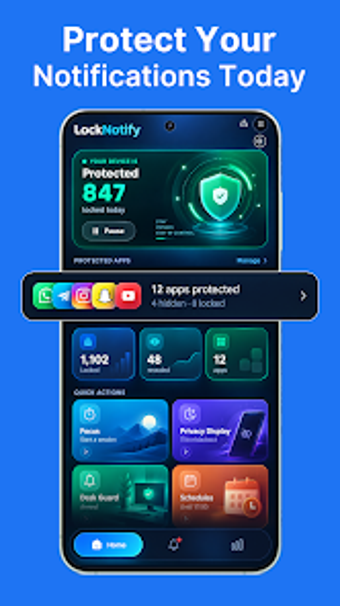
Notification Lock-Screen Guard from TOPEDGE TECH protects private alerts on Android devices by intercepting and neutralizing lock-screen previews. The app encrypts notification content locally and replaces previews with neutral stubs, then stores alerts behind a PIN-protected vault. Key controls include four privacy tiers, Desk Guard auto-mute, and a history log for dismissed alerts. Privacy-minded mobile users who want to stop shoulder-surfing and recover missed notifications gain direct control over which apps reveal previews.
What the app does to protect notification content
The app intercepts incoming notifications via Notification Access and encrypts their text locally, replacing previews with neutral placeholders that reveal no message content on the lock screen. Users unlock stored alerts inside a PIN-protected vault to read the original notification. This model prevents preview leakage while keeping the original alerts retrievable through the integrated history log rather than relying on system notification previews.
How it operates on an Android device and system requirements
Notification Lock-Screen Guard requires Android 5.0 or newer and uses the Notification Access permission to function, which means it acts at the OS notification pipeline. Because encryption and interception occur on-device, the tool does not send notification content off the phone. The Desk Guard feature changes notification behavior based on device orientation, so rules trigger locally when the phone is placed flat.
Security model and safeguards for sensitive alerts
The security approach combines local encryption with a PIN-locked vault, so sensitive text is unreadable without the PIN. The app offers four privacy tiers to govern how much metadata appears: Sender Only, App Only, Anonymous, and Pass Through. These tiered modes let users apply stricter display rules per app, reducing accidental exposure while keeping less sensitive alerts visible.
Control complexity and who can use it without risk
The app exposes granular, app-by-app settings that let advanced users whitelist apps or enforce strict masking for chosen sources. Casual users can select a single tier globally to avoid deep configuration. Accessibility permission may be required for advanced screen-guarding features, so users should enable those options only if they understand permission implications.
Practical choice for privacy-focused Android users
Notification Lock-Screen Guard is a practical option for users who need to prevent preview leakage and keep a recoverable record of alerts. Its on-device encryption and PIN vault provide a clear privacy model, while Desk Guard and tiered controls suit both cautious and hands-off setups. Use a conservative tier for sensitive apps and enable the history log if you rely on recovering dismissed notifications. Recommended.